
How to make the My Ride Is Here broom trend
Make mine with one photoThere are four ways to make the My Ride Is Here broom trend: prompt an AI video tool, give a tool your photo plus a car-window clip to copy, use a one-photo template, or drop your photo into a finished clip. Which one fits depends on how much you want to write and fix, and whether you want the shot from inside the car, the wave and the sparks exactly as in the trend.
- One photo, no prompt, no costume
- Works in your browser, no app
- The clip's original sound
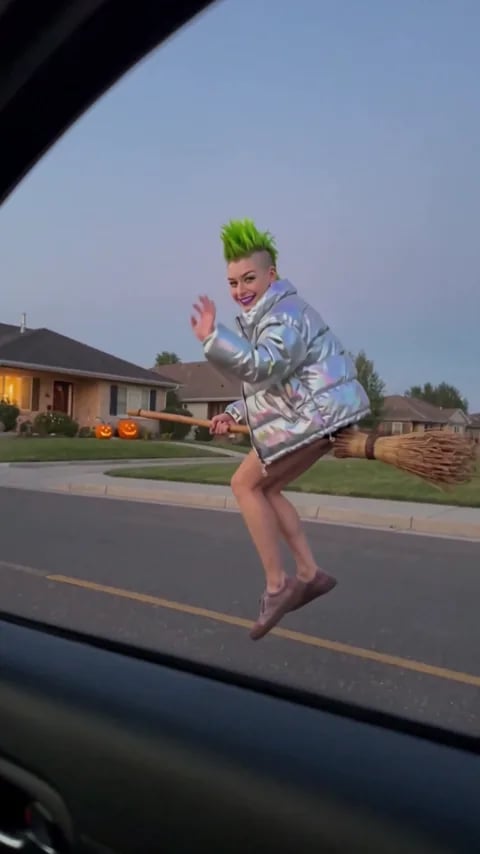
4 ways to make the My Ride Is Here broom trend
Each way asks for something different, and gives you a different clip. Apps are named only as examples.
| Prompt a video toole.g. Dreamina | Photo + a car-window clipA tool copies the ride's motion | One-photo templateIts own take on the ride | One finished clip (this site)You on a ready-made rideUse my photo | |
|---|---|---|---|---|
| You supply | A photo, plus a prompt you write | A photo, a car-window clip, plus a prompt | One photo | One photo of a person or a pet |
| The shot | Whatever your prompt describes; the viewpoint can drift | Follows the clip you give it, as closely as the tool manages | The app's own version of the ride | The same every time: from inside the car, the wave, the dash away in sparks |
| Sound | Depends on the tool | Depends on the tool | Depends on the app | The clip's original sound |
| Clip length & format | Depends on the tool and the duration you pick | Depends on the tool; guides suggest 5–8 seconds | Usually short; some come out landscape, not vertical | 10 seconds, 9:16, 720p |
| Effort | Write and rewrite the prompt, try a few times | Find a clip, write the prompt, check the broom and hands | Upload and wait | Add a photo, generate |
| Price | See the app's plans | See the app's plans | See the app's plans | Packs from $9.90 (1 video), one-time |
Want the finished ride with you on the broom?
No prompt, no car clip, no costume.
Which way fits you?
Prompt a video tool: you want your own setting
Dreamina's guide for the trend starts from a still of you on the broom and then animates it, so you choose the street, the time of day and the outfit. Getting the rider to stay on the broom and the camera to stay inside the car can take a few tries.
Photo + a car-window clip: you want a real car shot
Some tools take a reference video next to your photo and copy its motion and camera. Film a short clip through your own car window, or use one you have, and the ride follows it. You still write the prompt and check the broom and the hands.
One-photo template: you want it easy
Upload one photo and the app makes its own version of the ride. Clips tend to be short, and some come out landscape, so check the format before you post to TikTok or Reels.
One finished clip here: you want the trend version with sound
The 10-second clip is already made: alongside the car at dusk, the wave, and the dash away in orange sparks, past the pumpkins on the lawns. Add one photo of a person or a pet, and only the rider changes.
How to write a My Ride Is Here broom prompt
This is how public guides for the trend, such as Dreamina's and media.io's pages, lay the prompt out. Treat it as a starting point; we have not tested these prompts ourselves.
- 1
Set the camera first
Say it's filmed from inside a moving car, through the side window, as one continuous shot. Keeping one viewpoint is what makes it read as the trend.
- 2
Put the rider on the broom
Label your photo, for example Image 1, and say the rider sits on a wooden broomstick about half a metre above the road, level with the window, both hands on the handle.
- 3
Beat 1: keeping pace
Image 1 rides alongside the car and looks in. Short phrases set the scene: "quiet suburban street at dusk, pumpkins on the porches".
- 4
Beat 2: the wave
Image 1 smiles and waves at the people in the car. One wave is enough; more gestures tend to add extra arms.
- 5
Beat 3: the getaway
Image 1 speeds off ahead on the broom. For the Halloween look, add "a trail of faint warm sparks".
- 6
Say what stays and what to leave out
Same face and clothes as Image 1 in every frame; no witch costume unless you want one; no flying up into the sky, no extra limbs, no text or watermark. Only use photos of yourself, your own pets, or adults who agreed.
Common problems and what guides suggest
These are fixes that guides for the trend recommend, not results of our own tests.
The rider floats off the broom, or the broom bends
Say the rider stays seated with both hands on the handle, keep the path simple, and keep the clip short.
Extra arms appear
Cut down the gestures. A single wave is safer than a wave, a nod and a thumbs-up.
The camera jumps outside the car
Ask for one viewpoint, from inside the car through the side window, and "one continuous shot".
The broom is cut off in a vertical crop
Check that the whole rider and the whole broom stay in frame before you crop to 9:16, or generate in 9:16 from the start.
How to make the My Ride Is Here broom trend on this site in 3 steps
- 1
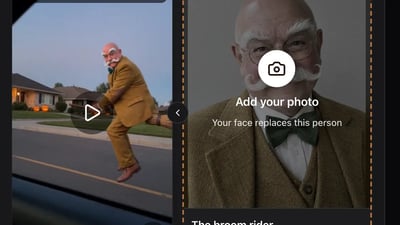
Choose who rides the broom
One person or one pet, facing the camera, with the whole face visible. Use yourself, or an adult who agreed to be in it.
- 2
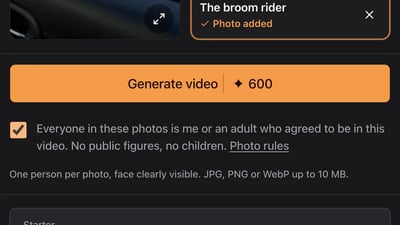
Add it to the broom rider slot
Drop the photo into the slot, tick the consent box and press Generate video.
- 3
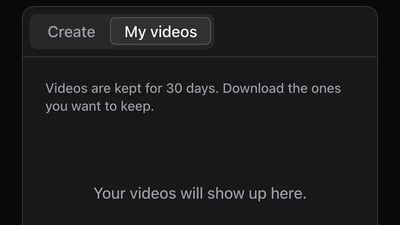
Collect the ride in My videos
Close the tab if you like. The video shows up in My videos when it's ready and stays there for 30 days to download or share.
Make your My Ride Is Here broom video with one photo
Add a photo for the broom rider. No prompt, no costume and no editing: the car window, the street and the sparks stay as in the clip.
One person per photo, face clearly visible. JPG, PNG or WebP up to 10 MB.
- No app
- No watermark
- Credits back if a video fails
Making the My Ride Is Here broom trend: questions
No. The everyday-clothes versions are the funny ones. On this site the rider wears whatever is in your photo; with a prompt tool, add "no witch costume" so the AI doesn't dress you up.
We didn't find a verified one when we looked on 16 October 2026. One guide suggests CapCut as an optional last step: trimming the clip and adding the "my ride is here" text.
No one song goes with it. The clip on this site keeps its original sound, and you can pick your own song in TikTok or Instagram when you post.
Here, pets can work too: use one clear photo of the pet facing the camera, with nothing else in the frame. With a prompt tool, use the same seated, hands-on-the-handle wording for the pet.
Some apps have a free tier, so check each app's plans. On this site it isn't free: each video uses 600 credits from a one-time pack, starting at $9.90 for one video. The small sign-up bonus doesn't cover a video, and failed videos give their credits back.
The clip on this site is 10 seconds, a 9:16 MP4 at 720p. Guides for the car-window-clip method suggest about 5 to 8 seconds; with prompt tools it depends on the duration you pick.
It depends on what you want. Your own setting: a prompt tool. A real car shot: a photo plus a car-window clip. Easy and quick: a one-photo template. The trend version, vertical with sound and no prompt: add one photo here.